With just barely less than one month out from beta 1 for 6.9 and after folks appreciated my last exploration post, I thought I’d continue the fun with another update. Again, this is new so feedback is welcomed. I do try to time box this as otherwise I could end up in an endless rabbit hole of PRs and debates on issues. As you’ll see too, where possible and relevant, I provided updates based on what I could see in my review to help bring this information to the entire community who is following along.
Note that I won’t cover every piece of 6.9’s roadmap so, if you want to go deeper, I recommend looking at the links shared under each top level item in the roadmap to learn more. I also won’t be overly explaining each feature so again refer to the roadmap for more context. I welcome questions and comments though!
For much of these, I’m using the Playground Gutenberg PR previewer and Playground with Gutenberg installed. In some cases, you’ll need to enable different experiments for now in Gutenberg > Experiments. This time, I tried to be a bit more explicit around what I’m doing where as it would help loads to have folks begin testing and giving feedback.
Ability to hide blocks
The ability to hide blocks is nearing completion, with technical and design reviews coming in as I write this to help land the feature as an experiment in Gutenberg. As you’ll see in a few other places here, adding a feature as an experiment first is a great way to get broader testing without rolling it out too far to too many people. In some cases, it’s the right approach and, in others, it’s better to roll out more broadly at the start to flush out feedback and bugs more rapidly. This is an art not a science! I used the Gutenberg PR previewer, powered by Playground, with the Gutenberg > Experiments > Block Visibility turned on for the following video.
Command Palette everywhere
After some questions around whether the command palette should work on the front end of a site, the collective answer was “no” for 6.9. The work since the last update when the command palette landed in Gutenberg 21.5 has mainly revolved around expanding the available commands, including resolving an issue I raised previously to return to dashboard and automatically registering screen navigation commands based on the global $menu and $submenu variables. Visually, not much has changed so I’m skipping a video for this one.
On my mind ahead of 6.9 are these related issues: Command Palette: Add context to post type commands & Command Palette: Consider adding keyword support for searching. With the Command Palette filled with more options in more places, it’s important we don’t lose the intuitiveness of the tool and prevent the dreaded “no results found” for obvious use cases that someone might want to accomplish. I added a comment to flag for some design contributors to consider with the time we have left.
Block commenting
A flurry of work has been done to fix bugs and address gaps in functionality, like the ability to re-open resolved comments. There’s more to be done though, including ensuring the current UI more closely aligns with the designs, graduating the feature from an experiment, and resolving a range of accessibility issues. To see a full run down, check out this label in Gutenberg’s GitHub repo. Here’s a quick look:
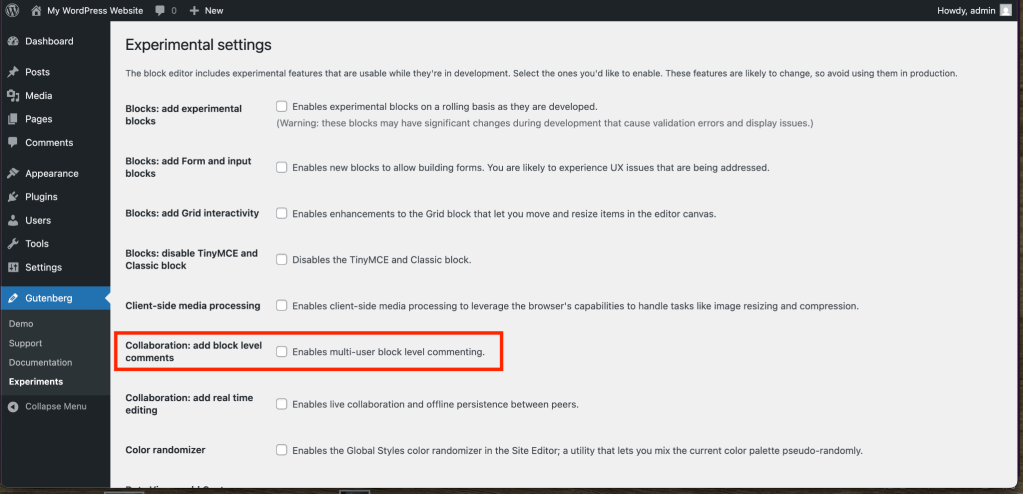
To test this you will need to head to Gutenberg > Experiments > check off “Collaboration: Enables multi-user block level commenting” and save.
New blocks
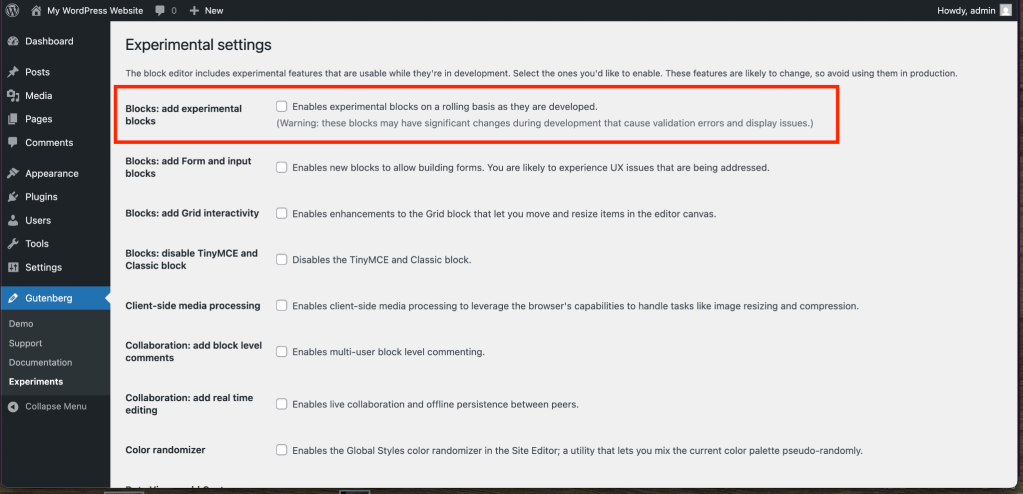
This was added to the roadmap post after I published it, hence the changelog on the roadmap and new call out in this post. For context, each block is being added as an experiment under Gutenberg > Experiments > check off “Blocks: add experimental blocks” and save. Rather than adding an experiment for each, they are all being put in the same “bucket”. The issue tracking this work and the latest update on that issue can be found here. Below is a rundown:
- Accordion block has been merged as an experiment in Gutenberg 21.5.
- Terms Query block has been merged as an experiment in Gutenberg 21.7.
- Post breadcrumbs block has an active (and recent) PR underway.
- Icon block has an active PR from Ryan Welcher who is also streaming the work he’s doing to build this block. Here’s part 1 and part 2.
- Stretchy text has two PRs (with a possible third in consideration to implement a block support feature): one creating a new block & one taking a new approach by adding a Stretchy Text block variation to the Group Block.
- Tabs block has an active PR that’s up to date with trunk and ready for review.
- Stabilizing the Time to read block is gathering momentum with a focused scope around what needs to land to implement it.
- Stabilizing Table of contents block is also in progress with some recent PRs but still remains TBD.
Here’s a quick look at a few of these blocks:
While each block is under the same Gutenberg experiment, they will be evaluated individually for inclusion into 6.9. Please help test! In just testing the above for this video, I already opened a bug and I was able to close out a prior feature request.
Simplified site editing
In a new issue titled Pattern Editing and contentOnly interactivity, a new path forward for a simplified site editing option was presented.
Instead of introducing Write/Design modes (#71340), or perhaps complementary to it, we could then make pattern editing default to contentOnly always. This would afford the simpler editing experience that we know is needed, without adding more complexity or modes to switch between—it’s just a function of a pattern. To fully edit the contents of a pattern permanently the user would “detach” it, essentially exposing all its building blocks normally. If editing the content globally they would edit the pattern in isolation like it happens today.
As noted here, this presents either a complementary approach to Write/Design modes or a fork in the road and contributors are hard at work to flush out what makes sense. At a high level, rather than having an on/off option folks would toggle to engage in a simpler editing experience, this would make that simplified editing experience baked into patterns with the option to engage in more complex tools as needed. Across both explorations, bugs are being fixed (like adding and deleting navigation block items) and solutions for Core blocks are underway (like ensuring a solid experience for the Query Loop block). Currently, there are two experiments exploring both pathways that you can turn on using Gutenberg > Experiments:
- “Simplified site editing” experiment enables the on/off toggle of the different modes.
- “contentOnly: Make patterns contentOnly by default upon insertion” experiment makes unsynced patterns contentOnly by default.
I recorded some longer views of the experiences to help give a better sense of how it might work. I had to use Gutenberg trunk to test this.
Here’s a video exploring the write/design mode toggle:
Here’s a video exploring the patterns having contentOnly on by default:
As you can see, there are big pros and cons to each. In user testing I did last year, the on/off toggle is very hard to find for the Write/Content mode so having it embedded at the pattern level is an interesting change. At the same time, again from user testing, folks sometimes have poor discoverability or usability of patterns in that they often need to make changes to make a pattern what they want. I could see it being cumbersome to add 2-3 patterns to a page and then “detach” (this language needs to be updated) the pattern in order to make edits you want. To get back to the more simplified state for the pattern, you’d then have to make it a pattern again which is very counterintuitive. In other cases, you might have a mix of patterns and blocks on a page creating a mixed experience in the editor that’s not exactly clear. I could rant longer but we’ll see how this progresses as we get closer to beta 1! It’s a hard but important problem to solve as, up until now, the site editor is an excellent theme builder tool with growing capability but can easily overwhelm someone new or less technical minded and it’s imperative we find a way to make that simpler.
Expanded template management
The initial PR to land a broader set of changes was merged with a list of follow ups expected. In the process of testing how the PR landed and in reviewing follow ups, a temporary revert was done with an additional Gutenberg 21.7 RC2 to remove this for now. For now, the feature will remain in Gutenberg trunk for more testing but will not land in Gutenberg 21.7. It’s expected an updated PR for this functionality will land in the next Gutenberg release as a result.
Thanks to this ongoing work, a list of problems will be solved including: the ability to retain custom templates when switching themes, the ability to draft a template rather than having it immediately go live, revisions for templates working properly on the first save, allow multiple templates with the same target slug, and more. It’s an exciting, big change with a lot of moving pieces so please help test!
Various dev updates
Block bindings
Bindings support for Pullquote is ready for review with a clear path for other similar Core blocks to follow, according to the latest update. Alongside this work, a PR is to communicate supported block attributes from server side is being worked on that ties in with a larger effort to open up the block bindings/pattern overrides feature for custom blocks that use dynamic rendering. The latter is still experimental and early so I’m curious to see how it develops head of 6.9.
UTF-8 Updates
A broader effort to unify and standardize UTF-8 handling is in progress:
Core uses a wide variety of methods for working with UTF-8, especially so when the running server and process doesn’t have the
mbstringextension loaded. Much of the diversity in implementation and specification in this code is the legacy of the time and context in which it was added. Today, it’s viable to unify and standardize code handling UTF-8, which is what this ticket proposes.WordPress should unify handling of UTF-8 data and depend foremost on the
mbstring-provided functions which have received significant updates during the 8.x releases of PHP. When unavailable, WordPress should defer to a single and reasonable implementation of the functionality in pure PHP.
This has included a range of PRs with the following currently merged and more planned:
- Charset: Abstract new UTF-8 scanning pipeline from validation fallback.
- Charset: Create
compat-utf8.phpmodule with fallback code. - Formatting: Rely on _wp_can_use_pcre_u() to detect Unicode PCRE support.
- Introduce custom UTF-8 decoding pipeline.
Abilities API
An initial version landed with a version 2 already underway. Contributors are discussing what to land and how for 6.9 along with which abilities to bundle by default. A client side package for the Abilities API is also in progress and expected to land that would “provides access to abilities registered on the server, making it easy to discover and execute WordPress abilities from JavaScript code”.
Interactivity API
Alongside some PRs that were merged, including work that fixes getters when they access state, various in progress efforts are underway like, skip directive execution for “lazy” derived state props and update router regions inside elements with data-wp-interactive. With beta 1 looming, the following areas of work are being prioritized for the next month:



 agm
agm 
Leave a reply to Gutenberg Times: WordPress 6.9 is coming, moar plugins, Query block and fonts—Weekend Edition 342 – My Blog Cancel reply